

How to Choose the Right Omnichannel Contact Center Solution: Checklist Included
Key Takeaways
- The right solution should preserve customer context, help agents resolve issues efficiently, and give supervisors reliable visibility across every interaction.
- Omnichannel isn’t just “more channels”; it’s context that follows the customer everywhere.
- AI should do more than power a chatbot. Look for AI-assisted routing, transcription, speech analytics, quality analysis, automation, and other capabilities.
- Evaluate the platform against your business architecture, including integrations, deployment model, scalability, security, tenancy, and reporting, not just its feature list.
- Test the platform before you commit. A short, direct vendor checklist (further down) gives you the exact questions to ask before you sign.
Customers expect to contact a business through the channel that suits them and receive a consistent answer. A customer might begin with a website chat, continue through email, ask for an update over WhatsApp, and finally call an agent. If every interaction is handled in isolation, the customer has to start over each time.
That is why choosing an omnichannel contact center solution is an operational decision, not just a software purchase. The platform affects customer experience, agent productivity, service levels, reporting, staffing, automation, and the cost of every interaction.
Get it right, and you get faster resolutions and customers who don’t have to repeat themselves. Get it wrong, and you’re just adding more software, more dashboards, and more places for customer information to get lost.
This guide explains what to look for, which questions to ask vendors, how AI fits into the operating model, and how to compare platforms against measurable KPIs.
What Is an Omnichannel Contact Center Solution
An omnichannel contact center solution is a platform that brings customer interactions across multiple channels into a single platform, with one continuous record of each customer’s interaction history.
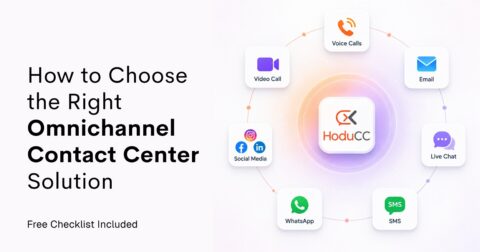
These channels can include:
| Voice | Video | Live Chat | SMS | Social Media | |
|---|---|---|---|---|---|
| Messaging apps (WhatsApp, Telegram) | Self-service | ||||
In practical terms,
- Customers can
- Connect through any feasible channel.
- Switch channels if needed, without having to repeat their issue.
- Agents can see relevant previous interactions, like
- The reason for the contact,
- Any information already collected, and
- The next action required.
- Supervisors can monitor activity and performance across channels instead of relying on separate reports.
Note: “Omnichannel” is often confused with “multichannel.” A multichannel contact center gives customers multiple ways to contact you (voice, email, chat, and social media), but each channel can still operate in a separate queue or system. Omnichannel technology connects those channels and interactions, so the customer journey is continuous.
How Does an Omnichannel Contact Center Work?
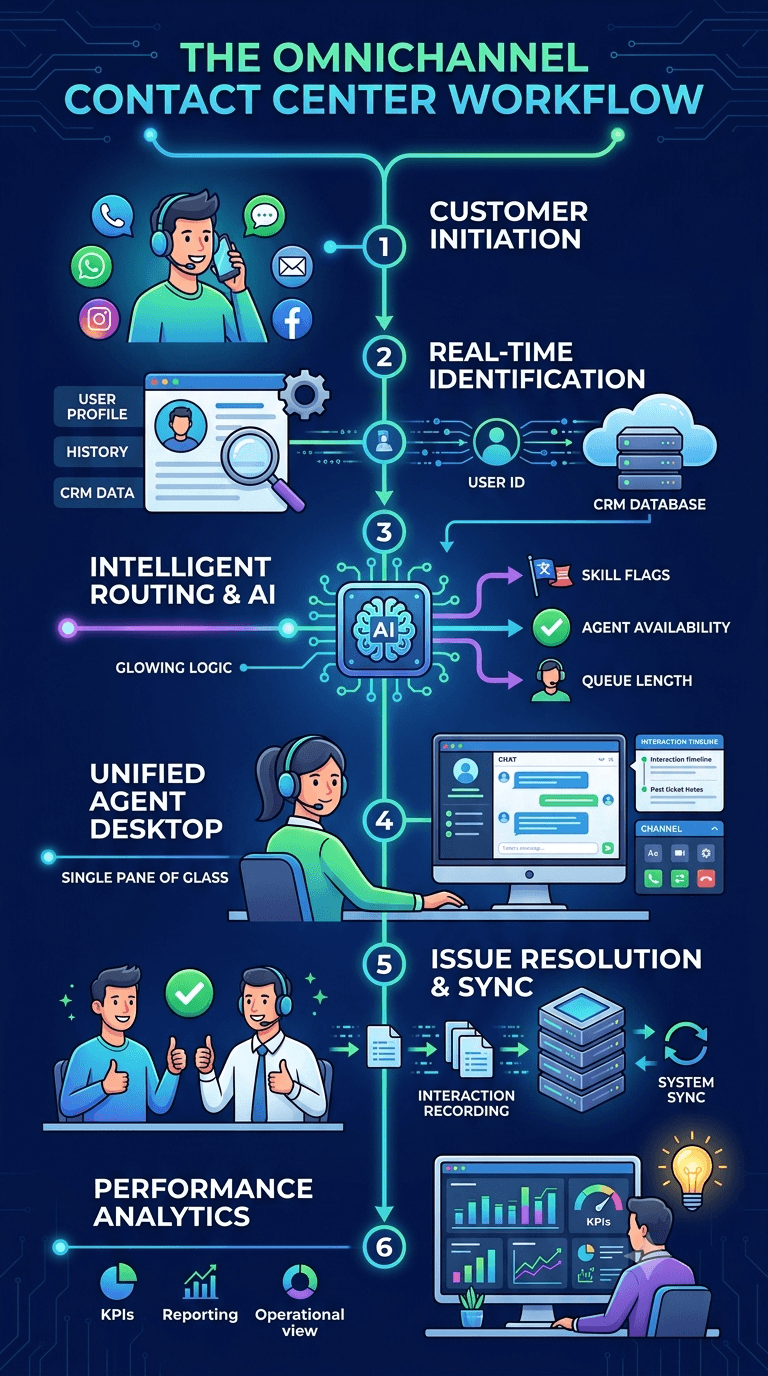
A typical omnichannel workflow looks like this:
1. Customer chooses a channel
A customer initiates contact via any support channel (e.g., voice, WhatsApp, email, or web chat).
2. Real-time identification & context lookup
Customer information and previous interactions can be retrieved from the contact center platform or connected CRM via phone number, account ID, or cookie.
3. Smart Routing & AI Analysis
Routing rules, forms, or AI determine where the interaction should go based on factors such as agent skills, language, availability, queue, customer history, or workflow.
4. Unified Agent Workspace
The agent receives a screen pop containing the complete customer history, past ticket notes, and active channel controls inside a single pane.
5. Data Synchronization
The issue is resolved, escalated, followed up, or closed. The platform records the interaction and makes performance data available for reporting, quality management, and workforce planning.
6. Analytics turn interactions into insights
Managers can monitor customer, agent, campaign, channel, and operational performance.
The Five Things That Make a Contact Center Truly Omnichannel
A contact center can advertise ten channels and still deliver a fragmented customer experience. To determine whether a platform is genuinely omnichannel, look for these five characteristics.
1. Cross-Channel Context
When a customer changes channels, the platform should recognize the relevant customer or case. Agents should not have to search through disconnected systems to understand who they are helping.
2. A Single Customer Record
Supervisors and agents view a chronological history of every interaction, not just how many calls or chats happened separately. A chat transcript, email thread, call summary, attachment, or previous case should be available to the next agent when the interaction moves between channels.
3. Intent and Priority Routing
A customer with an urgent problem should not be placed into a generic queue simply because they switched from chat to voice. Routing should use the interaction’s intent, history, priority, and required skills.
4. Centralized Operational View
Agents need a usable workspace. Supervisors need real-time visibility into queues, workloads, escalations, quality, and customer sentiment or intent where available. Both views should be connected to the same underlying interaction record.
5. Service Levels Across Channels
An omnichannel solution should help managers understand response times, backlog, transfer rates, resolution, and service-level performance across voice and digital channels. Email and messaging may be asynchronous, so their service levels should not be measured exactly like phone calls.
A useful rule: If a platform offers many channels but loses context during a handoff, it is providing channel variety, not true omnichannel continuity.
Core Features to Look for in an Omnichannel Solution
The best omnichannel contact center software should not simply offer a long list of channels. Each capability should contribute to a connected customer journey or a more efficient contact center operation.
| Feature | Why Is It Important? |
|---|---|
| Unified Customer History | Gives agents visibility into relevant previous interactions and unresolved issues. |
| Built-In CRM / CRM Integration | Connects customer information with communication workflows for more contextual interactions. |
| Self-service and IVR | Helps customers resolve routine requests and collects information before escalation. |
| Ticket Management | Turns customer requests into trackable cases and makes follow-up easier. |
| Advanced Automatic Call Distribution (ACD) | Distributes inbound interactions to the appropriate queues or agents. |
| Skill-Based Routing | Matches interactions with agents who have the appropriate skills. |
| Advanced Routing | Supports more sophisticated routing logic using IVR, APIs, skills, and business rules. |
| Agent Workspace | Reduces tool switching by bringing relevant interaction information into the agent workflow. |
| Real-Time Analytics | Gives supervisors visibility into queues, interactions, and agent performance. |
| Call Recording | Supports training, quality management, compliance, and dispute resolution. |
| Single & Multi-Tenancy | Allows businesses to choose an architecture appropriate to their operational model. |
| White-label architecture | Lets businesses customize the platform with their own branding to offer contact center capabilities under their own brand. |
| Remote/hybrid agent support | Enables agents to work securely from different locations while maintaining access to contact center tools. |
| Cloud / On-Premise Deployment | Provides flexibility for organizations with different infrastructure, security, or operational requirements. |
| SSO & Access Controls | Simplifies secure access while supporting centralized identity management. |
Note: Do not evaluate a feature only by whether it exists. Ask how it works during a real interaction, which plan includes it, what data it needs, and how success will be measured.
How AI Powers Modern Omnichannel Contact Centers
AI in a contact center isn’t a differentiator anymore; nearly every vendor claims it. The real question is where AI works and how much of your interaction volume it can handle.
A chatbot alone should not determine whether a platform is AI-ready. When evaluating an AI-powered omnichannel contact center, look for capabilities that improve routing, agent productivity, customer understanding, automation, and quality.
AI Features to Evaluate
| AI Feature | Why Is It Important? | Who Is It For? |
|---|---|---|
| AI Chatbot | Handles repetitive queries instantly, 24/7, freeing agents for complex issues | High-volume support teams |
| Channel-specific bots (e.g., WhatsApp Bot) | Handles routine customer conversations through WhatsApp-based workflows. | Retail, e-commerce, D2C brands |
| AI-Assisted IVR Routing | Uses intelligent interaction handling to improve how customers are directed through voice workflows. | Customers, contact center managers |
| Auto Voice Transcription | Converts conversations into searchable text, reducing manual note-taking and enabling downstream analysis. | Agents, supervisors, QA teams |
| Speech Analytics | Analyzes conversations to identify patterns, customer signals, and agent interaction quality. | Supervisors, QA, operations |
| Automated Quality Analysis | Helps evaluate interactions against defined quality criteria at scale. | QA teams, supervisors |
| Post-Call Automation | Reduces manual work after interactions by supporting automated follow-up workflows. | Agents, operations teams |
| AI-Powered Insights | Helps organizations turn large volumes of interaction data into actionable operational information. | Managers, CX leaders |
| AI-driven quality scoring | AI scoring evaluates every interaction on every channel, catching issues that sample-based QA misses entirely | Contact centers serious about consistent service quality |
| Agent knowledge assistance | Surfaces relevant information or suggested responses while the agent works | Agents |
Omnichannel Contact Center Benefits: The KPIs That Prove It’s Working
The value of omnichannel isn’t simply that customers get more ways to contact you. The real value shows up in how easily customers get help, how efficiently agents work, and how much the contact center can resolve without unnecessary effort.
Here is what you should expect to change when you pick the right omnichannel contact center solution:
1. Customers Are Happier
When customers can switch channels without repeating themselves, get faster responses, and retain context, the experience becomes easier and more personal.
- CSAT (Customer Satisfaction Score) – ↑ Increases
A mix of approachability, quicker responses, smoother handoffs, and personalization through shared context can improve how customers rate the interaction. - Customer Effort Score – ↓ Decreases
Less work for the customer to get resolved is the literal definition of this metric: fewer transfers, fewer “let me pull that up,” fewer repeated details. - Net Promoter Score (NPS) – May increase over time
More consistent service and fewer frustrating handoffs can support loyalty, although NPS is influenced by the entire customer relationship, not only the contact center. - Repeat-contact rate – ↓ Decreases
Better history, routing, and follow-up reduce the chance that customers need to contact the business again about the same issue.
2. Resolve More Issues, Faster
The right omnichannel contact center gives agents more context and routes interactions to people with the right skills. This should help the agent solve the problem from the get-go, rather than passing it between queues.
- First Contact Resolution – ↑ Increases
Agents can see previous interactions, customer details, case status, and information already collected. Better skills-based routing can also connect the customer to the right agent earlier. - Transfer rate – ↓ Decreases
Intent, language, customer history, and agent skills can be used to route the interaction more accurately. - Resolution time – ↓ Decreases
Agents spend less time searching for context, asking repetitive questions, or waiting for another team to explain the case. - Repeat-contact rate – ↓ Decreases
A complete resolution and better follow-up reduce unresolved issues from returning through the channel.
3. Respond Faster and Responsible
Omnichannel service distributes demand across voice and digital channels, while routing and self-service help customers reach an appropriate response path. This can reduce avoidable waiting and make queues easier to manage.
- Average speed of answer – ↓ Decreases
Better queue management, routing, staffing visibility, and self-service can reduce the time customers wait for live support. - First-response time – ↓ Decreases
Chatbots, templates, knowledge access, and digital routing can provide a faster initial response on chat, messaging, email, and social channels. - Service-level attainment – ↑ Increases
Supervisors can see demand across channels and adjust staffing, priorities, and escalation rules before service levels deteriorate. - Abandonment rate – ↓ Decreases
Shorter waits, callback options, self-service, and alternative channels give customers more ways to continue instead of leaving the queue. - Backlog – ↓ Decreases
Digital work can be prioritized, assigned, and tracked instead of remaining in disconnected inboxes.
4. Improves Overall Agent Performance
A connected workspace can reduce that friction and give agents more time for conversations that require judgment.
- After-contact work time – ↓ Decreases
Automated notes, summaries, templates, CRM updates, and shared records reduce manual documentation. - Average handle time (AHT) – May Decrease
Better context, knowledge access, and routing can shorten unnecessary search and explanation time. AHT should not fall at the expense of resolution quality. - Quality score – ↑ Increases
Agents have more consistent information, clearer workflows, and better access to coaching or interaction history. - Unnecessary transfer rate – ↓ Decreases
Skills-based routing and customer context reduce the number of times an agent has to pass the customer elsewhere. - Agent satisfaction – May Increase
Agents can spend more time solving meaningful problems and less time navigating disconnected tools.
How HoduCC Fits Into Your Business Model
HoduCC’s Omnichannel CX Suite is built around the five-point test and feature set covered above, not as a marketing checklist, but as the actual architecture.
Channels are unified under one routing engine, agents work from a single workspace, and AI evaluates interactions across the full volume rather than a sample.
| What You Need | How HoduCC Delivers It |
|---|---|
| Full channel coverage without silos | Voice, email, chat, SMS, WhatsApp, and social media unified on one platform |
| Customer context | Built-in CRM or integration options, keeping previous interactions and customer information always available |
| Messaging | SMS integration , WhatsApp broadcasting , social interactions & messaging workflows |
| Deployment flexibility | Cloud, on-premises, and hybrid options |
| Single and Multi-tenancy | Purpose-built for BPOs and MSPs managing multiple clients or brands |
| Standout AI Features |
All inbound and outbound calls are – Scored, – Categorized – Summarized – Transcribed |
| CRM Integration | Native integrations with Salesforce , Zendesk , Zoho , and Freshdesk |
| Enterprise-grade security | Single Sign-On and role-based access across admin, tenant, supervisor, and agent levels |
| Remote operations | Remote agent capabilities and WebRTC-based communication |
HoduCC may be a strong fit when your organization needs a configurable contact-center solution, wants to connect voice and digital workflows, or needs chatbot-supported service without removing human escalation.
It’s All About Choosing the Right Fit, Not Just the Right Features
The right omnichannel contact center solution isn’t the one with the longest feature list. It is the one that fits your customer journeys, technology stack, workforce, operating model, deployment requirements, and future plans.
The choice can be confusing and chaotic, so, let us help you out. Use the checklist below during discovery calls and demos for both clarity and assurance that the omnichannel solution is worth your investment.
Frequently Asked Questions
Multichannel means multiple channels operating independently. Omnichannel means those channels are unified, so customer context carries across all of them without repetition.
Yes, though most modern vendors are cloud-only. Platforms like HoduCC support cloud, on-premise, and hybrid deployment for businesses with data residency or compliance requirements.
Important capabilities include connected communication channels, unified customer context, intelligent routing, CRM integration, ticketing, agent tools, analytics, AI and automation, quality management, security, and flexible deployment options.
Look past chatbots. Prioritize AI that covers full interaction volume, quality scoring, speech analytics, and transcription applied to every conversation, not a sampled subset.
AI can support customer self-service, intelligent routing, transcription, speech analytics, quality analysis, automation, and post-interaction workflows. The value depends on how deeply AI is integrated into the contact center's actual workflows.
Yes, many platforms offer scalable, pay-for-what-you-need pricing that makes omnichannel viable even for smaller teams, without paying for enterprise-scale capacity upfront.
Yes. HoduCC's multi-tenant architecture lets BPOs and MSPs manage multiple clients or brands on one platform, with separate data, configuration, and branding per tenant.
Start by evaluating customer journey continuity, channel support, routing, AI capabilities, agent experience, CRM and system integrations, deployment options, scalability, security, reporting, and total cost of ownership. Then test the platform using real customer scenarios.
Yes. Many modern platforms support remote and hybrid contact center operations. When evaluating a platform, check its browser-based communication, remote access, security, monitoring, and administration capabilities.