

AI in the Contact Center: Use Cases, Results and Where It Falls Short
Key Takeaway
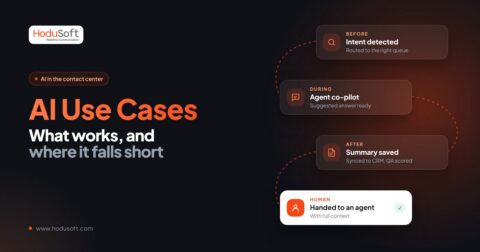
- The most dependable AI use cases in a contact center are the unglamorous ones: after-call summaries, scoring every interaction instead of a small sample, smart routing, and self-service for simple, repetitive questions.
- Real-time voice automation and agent prompts can work, but they fail more often. Start with them only after the basics are stable.
- AI works best as a first responder and a back-office assistant. Complaints, disputes, and emotional calls still belong to people.
- Pick use cases by volume, risk, and data readiness, not by what a demo makes look impressive.
- Platforms that let you start small and switch features on module by module save you from a big-bang rollout.
We’ve worked with AI features across calls, chats, email, and WhatsApp, and the pattern is consistent. Some use cases quietly save hours every day. Others look great in a demo and annoy everyone in production.
Below, we group use cases four ways (by moment in the interaction, industry, team, and support workflow) so you can find the ones that fit your operation instead of reading a generic list.
What’s Inside This Guide
- Use cases by moment in the interaction
What AI does before, during, and after a conversation. - Use cases by industry
How the same tools change shape in banking, healthcare, telecom, retail, and BPO. - Use cases by team
What agents, supervisors, QA, sales, and operations each get out of it. - AI use cases for support automation
What to automate fully, halfway, or not at all. - The AI use cases that matter most
The short list worth starting with. - How to choose the right use cases
A practical filter, plus mistakes we’d steer you away from.
AI is changing how contact centers handle customer interactions, support agents, and manage service quality. But the real opportunity isn’t in adopting every new AI capability.
It’s in identifying where customers need faster answers, where agents need better support, where managers need clearer visibility, and accordingly pick the right features and contact center software.
AI Use Cases Across a Customer Journey
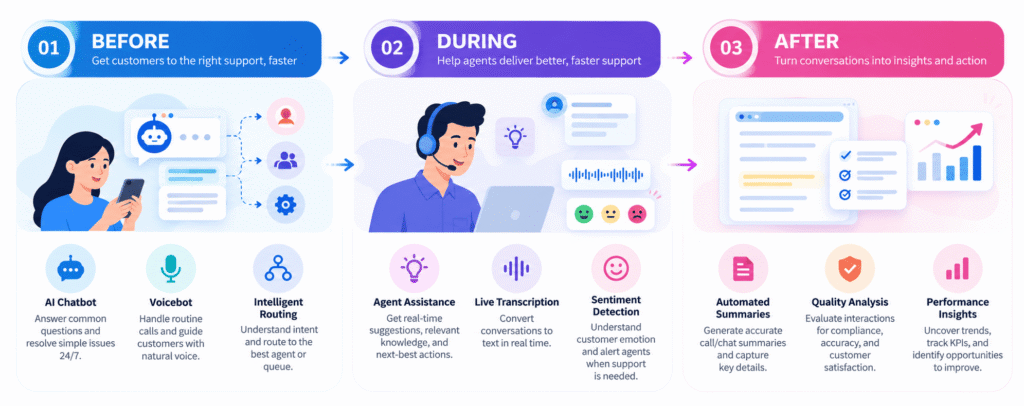
The cleanest way to think about using AI in a contact center is to follow one conversation from start to finish.
Before the Interaction: Intent Recognition & Context Building
- Self-service bots on chat, voice, and WhatsApp
A good AI chatbot, WhatsApp bot, or voicebot handles order status, account questions, appointment changes, and FAQs without ever reaching an agent. - Intent detection and smart routing
AI can identify the reason behind an inquiry and use that information to direct it to the appropriate queue or team, based on skill or language. - AI-assisted IVR
Replaces “press 4 for billing” menus with something that understands a plain sentence.
What not to do: A bot with no exit. If customers can’t reach a person quickly, containment numbers look good while satisfaction drops. We learned to treat the handoff as the product, not an afterthought.
During the Interaction: Give Agents a Better Co-Pilot
- Live transcription
Dual-channel, real-time transcripts give supervisors something searchable and agents a record they don’t have to type.
- Sentiment signals
AI can analyze language and conversational signals to identify frustration, urgency, or potentially sensitive interactions, which can then be flagged accordingly to the supervisor. - Natural-sounding AI voice prompts
Text-to-speech prompts for IVR and callbacks, so you’re not recording a new audio file for every change. - Agent Assist
AI can surface relevant knowledge articles, product information, policy details, or suggested responses while an agent is handling an interaction.
What not to do: Real-time prompting aimed at the agent. Agents on the receiving end of this commonly describe it as distracting, like someone reading over their shoulder, and they tend to prefer a post-call debrief.
After the Interaction: Turn Conversations into Useful Information
- Automated call summaries & disposition
AI can generate concise summaries of customer interactions, capturing the reason for contact, important discussion points, actions taken, and next steps. It saves current agents time (writing notes), while maintaining context for next interactions. - Quality assurance for every interaction
Traditional quality assurance often relies on supervisors reviewing a limited sample of recorded calls. AI-powered quality analysis can evaluate interactions against configured criteria, flag potential quality gaps, and help teams identify conversations that need human review. - Agent performance insights and coaching
AI can help supervisors identify patterns in agent performance, such as repeated knowledge gaps, communication issues, or difficulty resolving particular types of inquiries. - Categorization and labeling
AI can apply consistent labels to calls, chats, and messages. Plus, automatically categorize customer interactions based on their intent, topic, outcome, or issue type. - Customer feedback and trend analysis
AI can process interaction transcripts, feedback, and sentiment signals to identify recurring customer concerns.
How AI in the Contact Center Looks Across Industries
AI capabilities may be similar across industries, but the problems they solve are not. A bank prioritizes transaction accuracy, a healthcare provider handles sensitive patient information, and a retailer manages fluctuating order volumes.
| Industry | Practical AI use cases | Where it helps |
|---|---|---|
| Banking & Financial Services | Answering account and service FAQs, routing transaction disputes, reminders, transcribing calls, summarizing interactions, flagging sensitive conversations and call scoring for compliance. | Faster routine support, better visibility into customer concerns, and less manual documentation. |
| Healthcare | Automating appointment booking, reminders, and FAQs, handling scheduling inquiries, prescription refill status, routing calls by department, sending reminders, summarizing administrative interactions. | Reduces repetitive administrative work and frees staff to focus on patients who need personal attention. |
| Retail & E-commerce | Answering order-status queries, handling return and refund FAQs, sharing product information, WhatsApp-first support, routing complaints, analyzing customer feedback. | Manages high inquiry volumes while allowing agents to focus on complex orders and customer complaints. |
| Telecom | Answering plan and billing FAQs, automating service-status inquiries, routing technical issues, transcribing troubleshooting calls, identifying recurring complaints. | Reduces repetitive support work and helps identify recurring service problems. |
| BPOs | Multi-client routing, campaign-specific agent guidance, automated QA, workforce forecasting | Faster onboarding and scalable operations |
| Travel & Hospitality | Answering booking FAQs, handling routine cancellation inquiries, sharing travel policies, prioritizing disruption-related calls, summarizing interactions. | Speeds up routine assistance while helping agents manage complicated or time-sensitive situations. |
| IT & Technical Support | Automating basic troubleshooting, collecting issue details, retrieving knowledge articles, summarizing support calls, identifying recurring technical issues. | Reduces time spent gathering information and gives technicians more time for actual problem-solving. |
| Utilities | Billing questions, outage reporting, payment reminders, field-service scheduling | Reduced call volume and better outage communication |
Important: AI applications in regulated industries should account for data privacy, authentication, accuracy, and human oversight. For example, healthcare AI should not independently make clinical decisions, and financial AI should not bypass required transaction controls.
AI Should Do More Than Answer Questions
It should help your contact center deliver better conversations, support agents, and gain visibility into what customers really need. See how HoduCC brings AI-powered automation and interaction intelligence into your contact center.
Explore HoduCC’s AI-powered contact center platformAI for Agents, Supervisors, QA and Beyond
AI doesn’t just change how customers interact with a contact center. It changes how different teams manage their daily responsibilities.
| Team | Where AI helps | Practical outcome |
|---|---|---|
| Agents | Knowledge assistance, transcription, summaries, and response suggestions. | Less manual work and quicker access to information. |
| Supervisors | Sentiment insights, interaction trends, and performance analysis. | Better visibility into team performance and customer issues. |
| QA team | Automated interaction evaluation, scoring, and flagged-call reviews. | Broader coverage and more focused quality reviews. |
| Sales and outbound teams | Smarter dialing, lead qualification, campaign assistance, and interaction analysis. | More focused conversations and better follow-up visibility. |
| Operations and workforce teams | Trend analysis showing why customers contact the business, recurring inquiry patterns, and interaction volumes. | Better staffing decisions and process improvements based on actual contact drivers, not assumptions. |
| IT and administrators | AI workflow configuration, integrations, and automation monitoring. | More consistent processes and manageable deployments. |
| CX leadership | A consolidated view of customer sentiment, interaction categories, and quality trends across voice, chat, email, and messaging channels. | A clearer picture of customer experience across every channel and more informed CX decisions. |
How to Automate Customer Support with AI (Without Annoying Customers)
Support automation is often the first place businesses look when introducing AI. And for good reason. Many support interactions involve repetitive questions, predictable processes, and information that can be retrieved from approved knowledge sources.
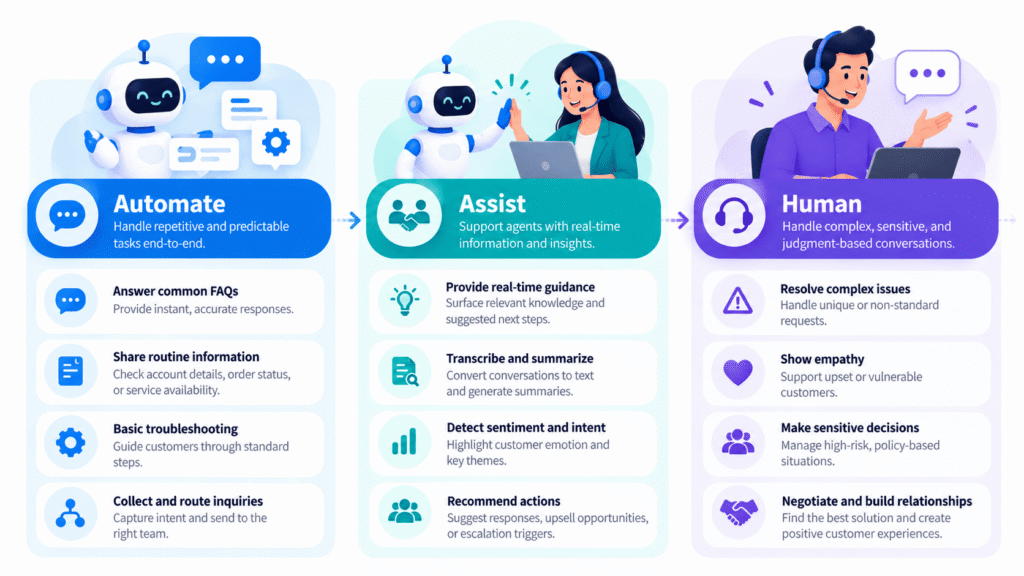
But automation should solve the customer’s problem, not simply prevent them from reaching an agent. So, we sort support work into three buckets.
Automate fully (low risk, high volume)
- Order and account status
- Appointment booking, changes and reminders
- Password, balance and plan queries
- FAQs on chat, voice and WhatsApp
Automate halfway (AI does the prep, a person decides)
- Ticket creation and summaries
- Email thread summarization
- Routing by intent, skill or language
- Disposition suggestions
Keep with people
- Complaints and billing disputes
- Regulated or high-value conversations
- Anything emotionally charged
A note on “containment”: A call that ended without an agent isn’t necessarily a resolved call. Track whether the customer called back, not just whether the bot closed the chat.
How to Choose the Right AI Use Cases for Your Contact Center
The biggest mistake businesses make is starting with the technology instead of the problem.
Before selecting an AI feature, look at where your contact center loses time, where customers experience friction, and where agents spend too much effort on repetitive work.
A practical evaluation should consider five things:
- Interaction volume: How frequently does the task occur?
- Repetition: Does it follow a predictable pattern?
- Business impact: Will improving it reduce effort, delays, or unresolved inquiries?
- Risk: What happens if AI gets the answer wrong?
- Readiness: Are the required data, knowledge sources, integrations, and workflows available?
A Checklist for Good AI Automation
Where to Spend Your AI Budget First
There are plenty of AI capabilities available today. But not every feature deserves equal priority or investment. For most contact centers, the following six use cases offer a practical starting point.
- Chatbot and WhatsApp self-service for repeat questions.
Removes volume that never needed an agent. - Automated summaries and dispositions.
Fast to deploy, easy to measure, and agents like it. - Scoring and analyzing 100% of interactions.
Evaluate a wider range of interactions and identify potential service gaps. - Smart routing by intent, skill and language.
Fewer transfers and quicker resolution. - Sentiment and conversation analytics
Helps identify customer frustration, recurring concerns, and patterns across interactions.
Voice bots and real-time agent prompting come later. They can work well, but they’re the ones that punish a weak knowledge base and unclear handoffs.
Where to Go From Here
In a contact center, AI isn’t just about putting a chatbot on your website or letting a voicebot answer incoming calls. It can identify why a customer is calling, retrieve relevant information, assist an agent during a conversation, summarize interactions, and help supervisors spot problems that might otherwise go unnoticed.
But there’s a catch. AI doesn’t automatically make a contact center better. A poorly configured chatbot can frustrate customers. An inaccurate AI recommendation can send an agent down the wrong path. And an automated quality score means little if it evaluates the wrong things.
The value comes from using the right AI capability at the right point in the customer journey. Pick two or three use cases, measure outcomes, and expand from there. The teams that get value from AI aren’t the ones using the most of it. They’re the ones using the right parts.
Start With the AI Use Cases That Fit Your Contact Center
HoduCC brings AI chatbot, voicebot, WhatsApp bot, transcription, and interaction analytics into one platform, on cloud or on-premise. Start with the use cases above and add more as you go.
Book a demoFrequently Asked Questions
Common use cases include AI chatbots, voicebots, intelligent call routing, real-time agent assistance, speech transcription, automated call summaries, sentiment analysis, and AI-powered quality monitoring.
AI can handle certain routine, predictable interactions independently, but it cannot reliably replace human judgment, empathy, and complex problem-solving in every customer situation. Most contact centers benefit from a combination of AI automation and human support.
AI helps agents retrieve relevant information, transcribe conversations, generate call summaries, and identify useful customer context. This reduces repetitive administrative work and allows agents to focus more on resolving customer issues.
A basic chatbot follows scripted flows. An AI agent can understand intent, use context, and complete a bounded task, with rules for when to hand off to a person.
Choose one or two high-volume, low-risk use cases, clean up your knowledge base, set clear success metrics, run a pilot, and expand after reviewing results.
AI automates repetitive support tasks such as answering FAQs, providing order or service updates, collecting customer information, handling basic troubleshooting, and routing inquiries. More complex issues can be transferred to human agents with relevant context.
Useful metrics include first-contact resolution (FCR), average handle time (AHT), after-call work (ACW), customer satisfaction (CSAT), successful AI resolution rate, escalation rate, and quality scores. Metrics should be evaluated together to ensure efficiency improvements don't come at the expense of customer experience.
Start with high-volume, repetitive, low-risk tasks such as FAQ automation, basic information collection, and call summarization. Agent assistance and intelligent routing are also practical starting points. The best choice depends on existing workflows, data quality, and business priorities.
Yes. AI can support interactions across voice, chat, email, and messaging channels by helping automate inquiries, analyze conversations, and improve routing. The value increases when relevant customer context is available across channels, reducing the need for customers to repeat information.
Common challenges include inaccurate knowledge sources, integration gaps, poor conversational experiences, data privacy concerns, unclear escalation processes, and insufficient performance monitoring. Businesses should address these issues before scaling automation.
Connect AI to approved knowledge sources, restrict responses for sensitive topics, test before launch, monitor conversations continuously, and maintain easy human escalation.
Generative AI can create conversational responses, summarize customer interactions, retrieve relevant knowledge, assist agents with suggested answers, and help analyze conversations. Its outputs should be grounded in reliable business information and reviewed where accuracy is critical. Write the blog for me; Angle – Divide the use cases into different sections so readers can understand more clearly Article structure – Key Takeaway (TL;DR) Introduction Content Index – heading of the section + one-line explanation Use cases by moment in the interaction Use cases by industry CTA Use cases by team Contact center AI use cases for support automation The AI use cases that matter most How to choose the right AI use cases for your contact center What good AI automation looks like (rules/you should look at); AI vs. human agents: Where each works best; Common mistakes to avoid Conclusion CTA