

Auto Provisioning For IP Phones, Built Into HoduPBX
Auto provisioning in HoduPBX UC software configures supported IP phones from one central portal. Assign a phone, connect it, and it collects its extension, SIP account, line keys, and feature settings from templates you define once, across every site.
- Enterprises
- MSP
- ISP
- ITSP
- Telecom
Book a demo
A walkthrough with a HoduPBX specialist, scoped to your phone models, sites, and extension plan.
Trusted by enterprises and service providers worldwide























Awards and recognition
 Capterra Shortlist 2026
  Software Advice Front Runners 2026
  GetApp Category Leaders 2025
  Software Suggest
  Globee Awards 2023 Gold Winner - Information Technology
  Unified Communications Product of the Year 2023
  Internet Telephony Excellence Award 2023
  NXTGEN BPO Confex and Awards 2023
  CIO Insider - Top 10 UC Providers 2023
  Digital.com Best Telemarketing Software
  Indian Achievers Award 2021
  Customer Contact Center Technology Award 2021
  UBS Forums
 The business case
Set up every IP phone from one central portal
Every desk phone needs the same set of details before it can make a call. HoduPBX auto provisioning delivers them from one place, and multi-site businesses running enterprise IP PBX deployments, MSPs, and ITSPs rely on it for every rollout.
- Faster rollouts. Phones are prepared in the portal before they reach the desk, so new offices and new hires get working phones sooner.
- The same setup at every desk. Users on the same template get the same keys, features, and settings, whichever site they work from.
- Fewer site visits. Most changes reach phones from the console, wherever they sit.
- Less hands-on IT work. Your team defines settings once in a template instead of configuring each phone individually.
- Room to grow. Adding a site, a team, or a customer is handled through the same templates and portal.

Platform capability
Auto provisioning for UC software, built for large phone estates
The capabilities that keep large phone estates consistent, from the first handset in a new office to the last phone in a national branch network.
Multi-vendor phone support
Yealink, Grandstream, Fanvil, Snom, and many other SIP phone brands, each with templates suited to its phone family.
Automatic first-boot setup
Once a phone is assigned in HoduPBX, its settings don’t need to be entered on the handset. It identifies itself and registers when connected.
BLF and presence keys
Line keys mapped to colleagues and queues, with live presence on the display from the first call.
Staged rollouts
Bring sites, departments, or customers online one at a time, on your own schedule.
Moves and replacements
Reassign an extension to a new MAC address, and the replacement phone collects the same settings.
Role-based access
Platform, site, and tenant administrators see and change only the phones and templates they own.
How it works
How HoduPBX auto provisioning brings a phone online
Auto provisioning moves the setup work off the handset and into HoduPBX. Your team prepares the phone once in the portal; on first boot it identifies itself and collects exactly what belongs to it.
- 1. Register the phoneAdd its MAC address and assign it to an extension, one by one or in a bulk list.
- 2. Assign a templateChoose the template that carries its account, keys, and site settings.
- 3. Connect and power onThe phone locates HoduPBX through your network settings or its provisioning URL, downloads its configuration, and registers.
- 4. Confirm in the inventoryThe device inventory shows the phone as registered and ready for its first call.
- 5. Manage from the consoleLater changes reach the phone through a remote resync, so most updates don’t need a visit to the desk.

Infrastructure
Provisioning infrastructure that holds up at every site
When phones configure themselves, the platform behind them has to be secure, reachable, and dependable at every site.
Part of HoduPBX, not a separate tool
Provisioning runs inside HoduPBX and is managed in the same administration portal as extensions, routing, and reporting.
Credentials managed on the platform
Each configuration file is tied to one phone's MAC address and served from your HoduPBX. SIP passwords reach the phone as part of its configuration, so they don't need to be written down, shared by email, or typed onto a keypad.
Head office, branch, or home office
Any supported phone that can reach your provisioning server can collect its settings, whether it sits on the head office LAN, at a branch, or on a remote worker's desk, and then register over your SIP trunking setup like every other extension.
Failover inside the call path
Once registered, provisioned phones benefit from automatic failover across routes and network links, so calls keep connecting when a carrier or link degrades.
What every provisioned phone receives
Behind every rollout: a 100+ partner network worldwide and 24/7 technical and onboarding support, from the first template to go-live and well after it.
Inside HoduPBX
Four screens manage every phone in your estate
Every view covers the whole estate or filters down to one site, one model, or one phone.
One view for every site
Your IT team manages handsets from the portal instead of logging in to each phone.
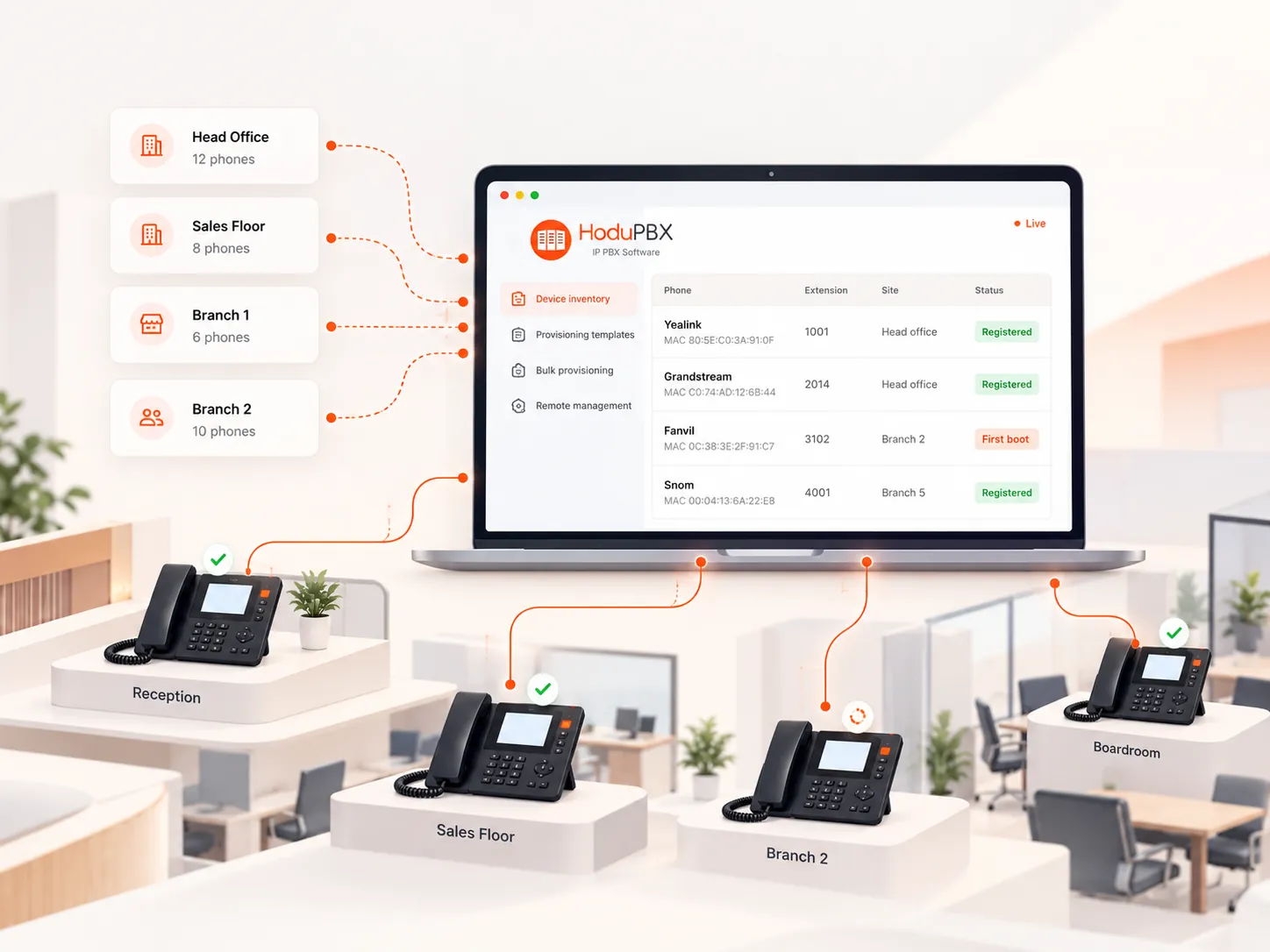
Know where every phone is and what it is running
Each phone is recorded against its MAC address, model, extension, and site, so your team can see which phones are live, which are waiting for first boot, and which need attention.
- MAC-based records — every phone is identified by its hardware.
- Registration status — registered, pending, or offline, at a glance.
- Site and department filters — narrow the view to one branch or one team.
- Tenant scoping — each tenant administrator sees only its own phones.
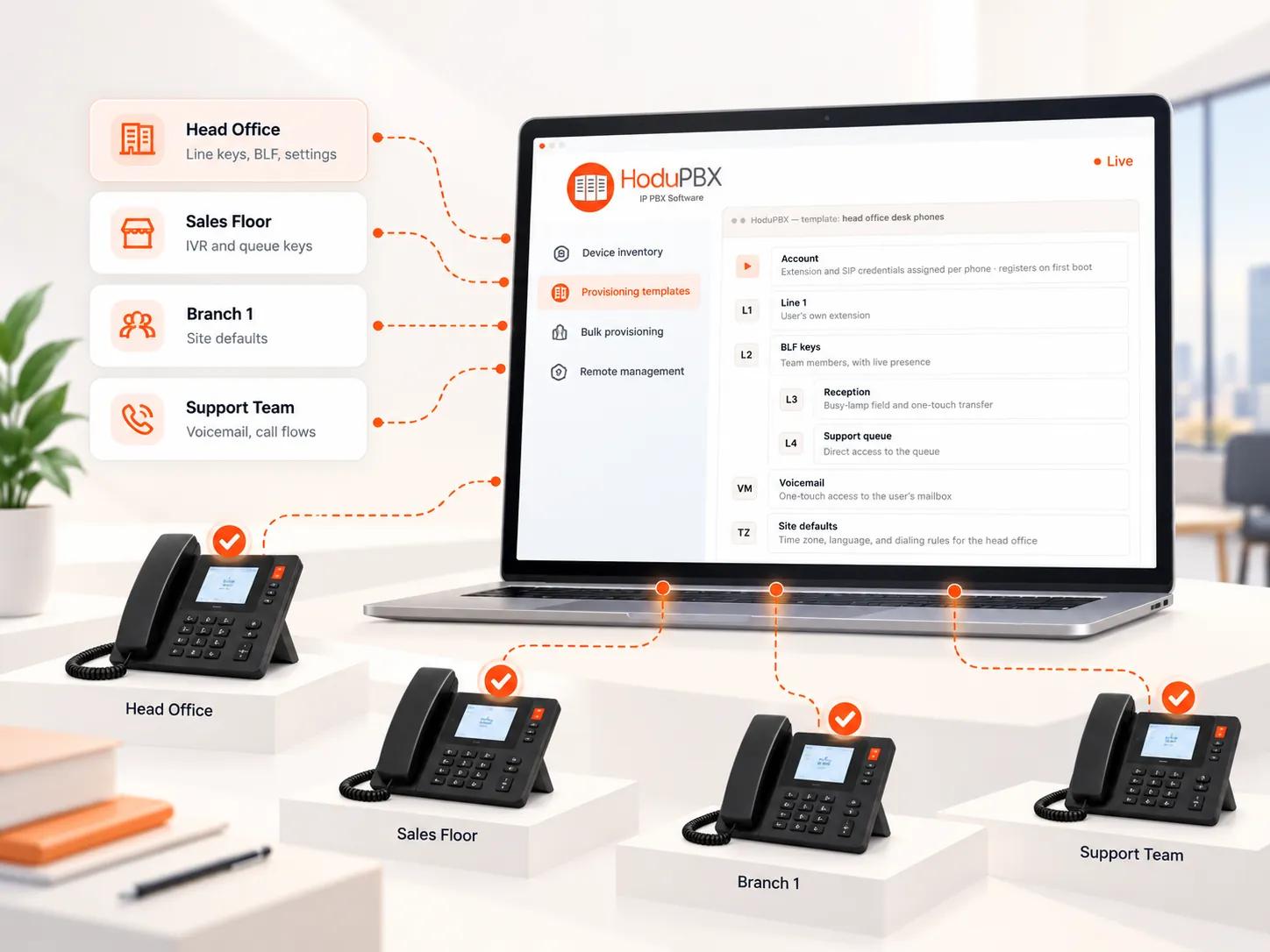
Define the setup once, apply it to every phone
Build a template once with the settings a group of phones should carry. Every phone assigned to it receives the same configuration, so users at every desk get the same experience.
- Per-model templates — settings shaped to each supported phone family.
- Site and department variants — the right defaults for every location and team.
- IVR and queue keys — one-touch access to the call flows your team uses.
- Reuse for new sites — assign an existing template to a new branch's phones.
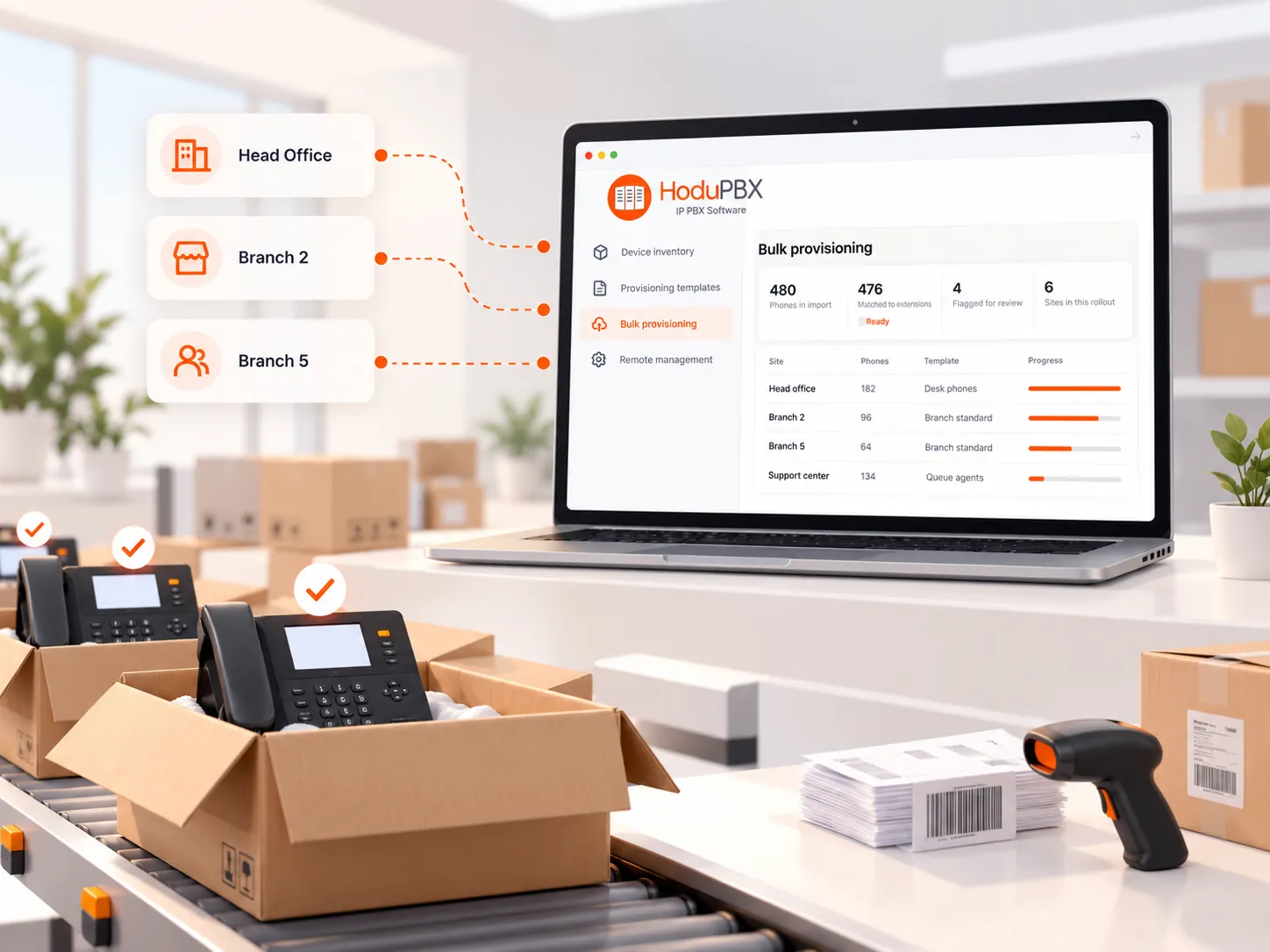
Prepare hundreds of phones before they leave the box
Import MAC addresses, extensions, and templates in one list, and HoduPBX prepares every phone in a single pass. By the time the phones are unpacked at each site, they are already expected.
- List import — MAC address, model, extension, and template per row.
- Validation — duplicates and unmatched extensions flagged before anything ships.
- Progress by site — see which sites are ready, in progress, or live.
- Multi-site ready — branch networks provisioned from one console.
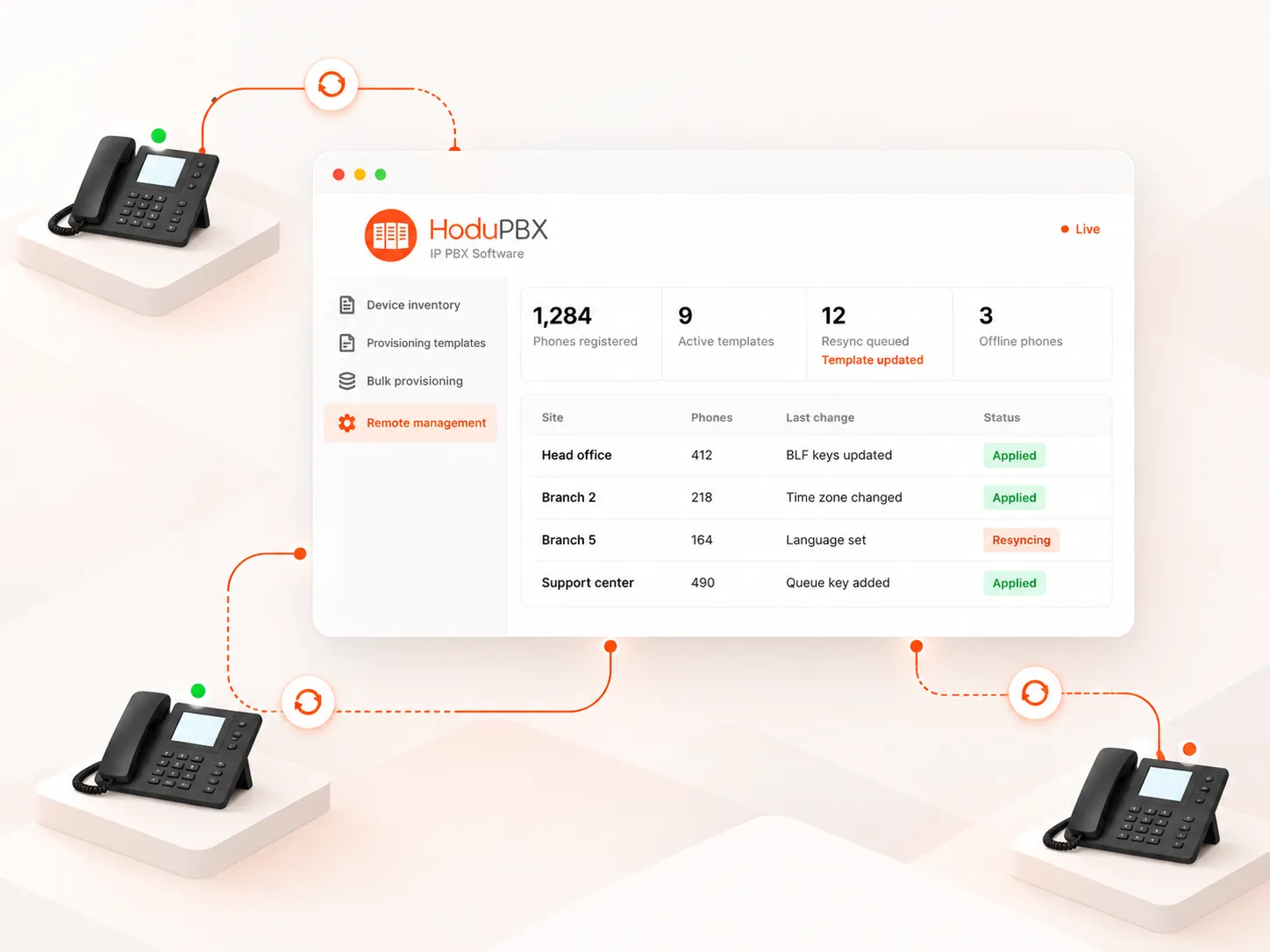
Change settings across the estate from the console
Update a template and push the change to one phone, a site, or every phone that uses it.
- Remote resync — phones collect updated settings on demand.
- Remote reboot — restart a phone or a group of phones from the console.
- Group actions — act on one phone, one site, or one template at a time.
- Audit trail — see which template and settings each phone is running.
Add-on modules
Extend what every provisioned extension can do
Switch modules on for the teams, sites, or tenants that need them, in the same administration portal.
Connectivity
SIP Trunking
Connect your preferred SIP trunk providers so every provisioned phone reaches the outside world through the carriers you choose.
Endpoints
Webphone
Browser-based calling over WebRTC for users who work without a desk phone, on the same extension and numbering plan.
Partners
Reseller Module
Let resellers create and manage their own customers and phones on your platform, under their own brand.
Messaging
SMS & MMS
Business texting on every extension’s own number through HoduPhone, the extension portal, or the Hodu Chrome extension.
Queues
Queue Pro
Live queue monitoring, wait-time visibility, and sticky agent routing for teams answering customer calls.
Records
Voice Transcription
Turn recorded calls into searchable transcripts for documentation, quality review, and compliance workflows.
Deployment
Shape IP phone provisioning around the way you operate
Hosting, rollout model, and provisioning method are independent choices. Pick the combination that fits your estate today; none of them closes off the others later.
Hosting
- CloudHosted by HoduSoft or in your chosen cloud region, including hosted IP PBX services.
- On-PremisesRuns on servers at your own premises where security or residency policy requires it.
- Data CenterHosted in your own data center or a colocation facility you choose.
Rollout model
- Single SiteOne office, one template set, every phone live on first boot.
- Multi-Site EnterpriseHead office and branches of an enterprise IP PBX provisioned by one IT team.
- Multi-Tenant ProviderOn a multi-tenant IP PBX, each tenant provisions its own phones from its own templates.
Provisioning method
- Network-AssistedPhones find the provisioning server through your network settings on first boot.
- Bulk ImportMAC addresses and extensions loaded in one list for large rollouts.
- Provisioning URLPoint a phone to its HoduPBX provisioning URL once, and it collects everything else.
Any combination, one platform
Every hosting option works with every rollout model and provisioning method.
Customer proof
What customers say about HoduSoft
Businesses and service providers that run their voice and unified communications on HoduSoft platforms.
We have companies which are geographically distributed and can use MPLS or Internet connections, even 4G, to talk to their teammates or customers. And you have the best support team at your service.
We've worked with HoduSoft since 2017 and it has been an incredible journey. The support team always prioritizes our needs.
HoduSoft team has been absolutely great; knowledgeable, responsive, professional, and they make custom changes right away.
Evaluation
Questions teams ask about auto provisioning
Auto provisioning is the automatic configuration of IP phones from a central server. Instead of entering an extension, SIP password, and feature settings on each handset, your team defines them once in HoduPBX. Each phone then downloads its own configuration, matched by its MAC address, and registers to its extension.
Very little. Your administrator registers the phone and assigns its template in HoduPBX; after that, setup at the desk is close to zero-touch. Someone connects the phone and powers it on, and it collects its configuration and registers without any settings being entered on the handset.
HoduPBX supports SIP desk phones from Yealink, Grandstream, Fanvil, Snom, and many other brands. Share your models with us and we will confirm support for your exact estate during the demo.
Yes. Bulk provisioning lets you import MAC addresses, models, extensions, and templates in a single list, and HoduPBX flags duplicates or unmatched extensions before rollout.
Yes. Each configuration is bound to one phone’s MAC address and served from your own HoduPBX platform, access to templates is role-based, and HoduSoft operates under ISO 27001:2022 and ISO 9001:2015 frameworks.
Bring every IP phone online from one console
Opening a new branch, refreshing desk phones across the business, or provisioning handsets for hundreds of customers: HoduPBX auto provisioning gives your team the control and consistency to do it across every site.