

What Is Interactive Voice Response (IVR)? And How to Use It
You call a company, and hear a calm, friendly recorded voice saying, “Thank you for calling. Press 1 for billing, 2 for technical support, or speak your request.” That’s an Interactive Voice Response (IVR) system in action.
What seems like a small touchpoint actually shapes the caller’s entire experience, routing them correctly, resolving simple queries automatically, and freeing up human agents to focus on more complex issues.
In the modern world, as businesses scale and customer expectations increase, having a robust IVR system is an essential part of a smart call center.
In this article, we’ll break it down: what IVR is, how it works, its core benefits, real-world IVR applications, how it ties into call center software, and tips for implementing it effectively. By the end, you’ll see how an IVR can transform customer experience and operational efficiency, and how to choose one that fits your needs.
What is Interactive Voice Response (IVR)?
An interactive voice response system is an automated telephony solution that interacts with callers via voice prompts or keypad (DTMF) input.
.
It captures caller input, processes it (via scripts, logic, or AI), and either provides a self-service response or routes the call to an appropriate agent or department. In other words, it’s that menu you hear when you call any major company, and increasingly, that “ask in your own words” voice system when conversational AI powers it.
How does an IVR System Work?
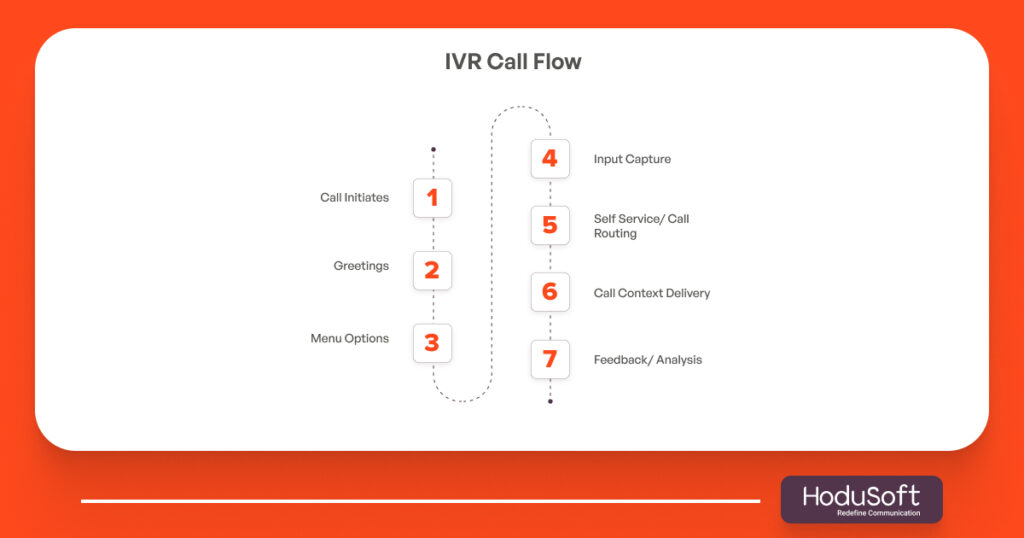
Let’s demystify the behind-the-scenes of an IVR system.
- Caller initiates a call
When a customer dials your support number, the call is immediately intercepted by the IVR system (rather than going directly to an agent). - Voice prompts/menu options
The IVR plays a greeting and a menu of prompts. For example: “Press 1 for invoices, 2 for support, or say your reason.” This can be touch-tone (DTMF) or speech-based (voice recognition).- Traditional systems rely heavily on DTMF keypad entry.
- Modern systems increasingly use natural language processing (NLP) to allow customers to speak freely.
- Input capture & logic processing
The system parses the input, identifies intent or menu choice, and follows a pre-programmed logic tree or conversational flow. - Self-service or call routing
- If the request is simple (e.g., check balance, hearing store hours), the system may handle it entirely without a human.
- If not, it routes the caller to the right agent or department using skills-based routing or other rules (often via an ACD module).
- Agent context delivery
When the call lands at an agent, the IVR may pass along context (customer’s earlier choices, account ID, reason) so the agent has a full background. This integration is typically part of call center software and CTI systems. - Feedback & analytics
The IVR system logs every interaction (which option was selected, how far the caller went, and drop-off points). Over time, that data helps optimize scripts, menus, and call flows.
This flow is the backbone of how IVR systems scale and streamline operations.
Why Use IVR? Key Benefits of IVR
Implementing an interactive voice response system isn’t just about sounding modern. It delivers powerful operational and customer-facing benefits:
1. Cost Reduction & Efficiency
By automating routine inquiries and call routing, businesses can reduce the number of calls that need live agents. Studies suggest IVR can cut customer service costs by up to 30%. Agents can focus on higher-value tasks instead of repetitive hand-offs or basic FAQs.
2. 24/7 Availability
Unlike humans, an IVR system doesn’t sleep. It can serve customers after business hours, on weekends, and across time zones, offering consistent service continuity.
3. Improved First Call Resolution (FCR)
A well-designed IVR funnels callers correctly to the right resource from the start. This reduces call transfers, follow-ups, and customer frustration.
4. Better Customer Experience
By reducing wait times and routing callers intelligently, IVR adds professionalism and responsiveness to your brand interaction. It also gives more control to callers (they choose, not guess).
5. Analytics & Insights
Every interaction with the IVR is data. You can track metrics like menu drop-off rates, abandoned calls, which options are most selected, and more. This helps you refine your call flows and understand caller pain points.
6. Scalability
As call volumes grow, you don’t need a linear growth in headcount. A robust IVR can scale horizontally (handling more callers concurrently) without proportionally increasing staff.
7. Prioritization & Smart Routing
You can embed logic to prioritize “VIP” callers, handle high-stakes requests first, or skip non-critical callers to the back of the queue. This ensures high-value calls get attention quickly.
8. Agent Morale & Productivity
Agents are more engaged when they deal with meaningful, non-repetitive tasks. By filtering out low-value or common calls, IVR helps agents stay focused and reduces burnout.
IVR Use Cases & Applications
An IVR voice response system isn’t just for call centers—its potential spans industries. Here are common IVR applications:
Call Center / Contact Center
- Route calls to the right department (sales, support, billing)
- Authenticate callers (e.g., account number, PIN)
- Provide self-service for status checks (order, invoice, shipment)
- Queue management, callback scheduling, and holds
Financial Services & Banking
- Check account balances, mini statements, and last transactions
- Bill payments, fund transfers, and due reminders
- Fraud alerts, OTP verification, and account activation
Utilities, Telecoms & Service Providers
- Report outages, request services
- Recharge top-ups, payment status, plan changes
- Tariff queries and usage summary
Airlines, Travel & Hospitality
- Flight status updates, seat availability
- Reservation changes, cancellation policies
- Airport info, baggage details
E-commerce & Retail
- Order tracking, return requests, and refund status
- Store locator, pricing inquiries
- FAQ self-service
Surveys & Feedback
- Post-call IVR surveys
- Market research, polling
- Interactive campaigns
Healthcare & Insurance
- Appointment scheduling, reminders
- Claims status, policy queries
- Prescription refill status
In each of these domains, IVR reduces friction and improves customer satisfaction.
How IVR Integrates with Call Center Software & ACD
An IVR system for a call center doesn’t operate in isolation. It is tightly coupled with call center software, Automatic Call Distributor (ACD) systems, and skills-based routing logic. Here’s how:
- ACD (Automatic Call Distributor)
ACD is the module that receives incoming calls and then distributes them to agents based on defined rules (load balancing, skill sets, availability). The IVR often hands off calls to the ACD once the caller’s intent is clear. - Skills-based Routing
Based on IVR-collected data (customer category, language, issue type), the system routes calls to agents who have specific skills (e.g., Spanish speaker, billing expert). - Call Center Software & CRM Integration
The IVR system often integrates with customer relationship management (CRM) systems. So when the call arrives at an agent’s system, the CRM screen pops up with customer data and IVR context, enabling faster, more personalized service. - Omnichannel Support
In modern contact centers, calls mix with chat, email, and messaging. IVR becomes part of a unified system, directing callers appropriately based on channel rules. - Callback & Queue Logic
When wait times are long, IVR can offer “callback when an agent is free” instead of making customers wait on hold. The ACD schedules and triggers the callback. - Monitoring & Reporting
The integrated software lets supervisors monitor IVR performance (drop-offs, abandonment, average path length) and tie these to agent performance and SLA compliance.
In sum: a high-functioning IVR system for call center environments is only as good as the ecosystem it sits within.
Best Practices & Tips for Designing IVR Flow
A poorly designed IVR can be worse than no IVR at all. Here are actionable tips:
- Keep menus shallow / limit levels
Too many layers frustrate callers. Aim for 2–3 levels max, and always include an “agent override” or “go back” option. - Use natural language prompts
Rather than rigid “press 1 for … press 2 for …”, design conversational phrases: “How can I assist you today?” This sets a more humane tone. - Support voice + DTMF hybrid input
Let callers either speak or press a number. Some prefer speed, others prefer clarity. - Offer “talk to a real agent” early
If the IVR isn’t getting what the caller needs, give an easy escape to a human—not a hidden option. - Prioritize common use cases
Your first menu should cover your highest-volume queries – billing, support, and status. Use data to identify these over time. - Use caller history/context
If a known customer calls, the IVR can adjust prompts (e.g., “Welcome back, would you like your last invoice?”). This improves personalization. - Test with real users & monitor drop-off points
Watch where callers exit menus. If many drop off at a particular stage, that flow likely needs simplification. - Provide clear error handling and fallback
If the system doesn’t understand input, prompt politely to repeat or simplify. Always have a fallback to human help. - Measure key metrics
Track abandonment rate, completion rate, average time in IVR, and calls transferred. Use this data to continuously refine. - Use multilingual support where necessary
For companies operating globally or in multi-language markets, support language selection up front.
Challenges & Limitations of the IVR System
To be fair, IVR isn’t magic. There are caveats and pitfalls to watch out for:
- Frustration from poor design
If menus are too long, unclear, or rigid, callers may hang up or bypass the system entirely. - Over-reliance on automation
If callers can’t reach a human when needed, satisfaction drops. The balance matters. - Integration complexity
Tying IVR with legacy systems or multiple databases can be technically challenging and costly initially. - Speech recognition errors
Natural language or voice input can misinterpret accents, noise, or dialects, leading to wrong routing. - Maintenance & updates
Business processes evolve. The IVR scripts must be reviewed and updated regularly, or they become stale. - Security & authentication risks
Sensitive functions (banking, payments) require strong authentication flows to avoid fraud.
Even with these limitations, a well-architected IVR delivers far more upside than downside.
Future Trends: Conversational & AI-Driven IVR
IVR is evolving fast. Here’s what’s trending:
- Conversational IVR / Voice AI
Instead of rigid menus, the system listens to free-form speech and uses NLP to detect intent. Callers can just say, “I want to pay my bill.” Studies show 66% of customers prefer natural-language IVR over voice menus. - Adaptive learning & personalization
AI models learn from past interactions to better tailor responses and suggest shortcuts. - Omnichannel voice + chat integration
The IVR system may transition seamlessly to chat or SMS, using the same conversational context. - Fraud detection & enhanced security
Voice biometrics, risk scoring, and behavioral authentication will reduce fraud in sensitive IVR flows. - Visual IVR / multimodal experiences
For smartphone users, a visual menu (on screen) can complement voice IVR. This reduces menu-reading errors. - Ethical AI & privacy-by-design
As AI becomes central, ensuring data security, interpretability, and ethical design becomes vital.
If you design your future IVR roadmap around these trends, you’ll stay ahead of competitors and evolving user expectations.
How to Choose a Good IVR System
Here’s a quick checklist to evaluate an IVR vendor or solution:
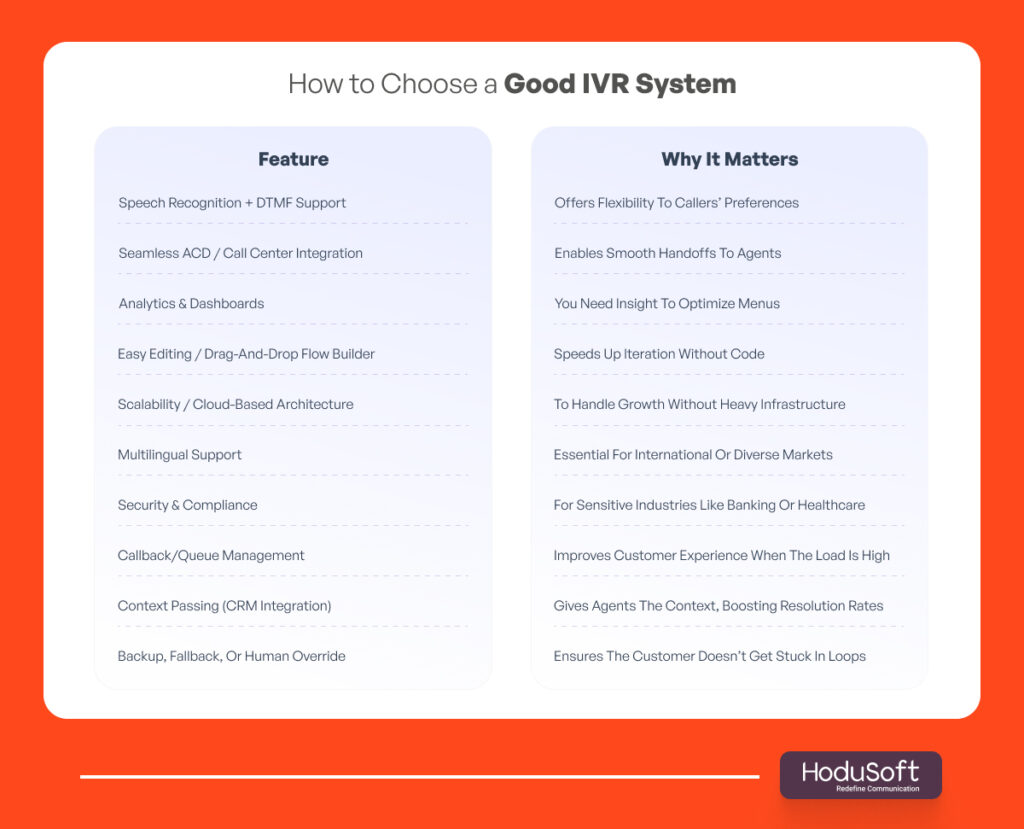
By vetting against these, you can narrow your vendor list and avoid costly regrets.
Conclusion
At HoduSoft, we believe a robust Interactive Voice Response system is a core pillar of modern contact center intelligence. When implemented with care, it becomes the gatekeeper, a friendly, efficient interface between your customers and your human agents.
Whether you’re handling hundreds or thousands of calls a day, as long as your IVR is smart, flexible, and well-tuned, it will continue to pay back in cost savings, customer satisfaction, and operational clarity.
If you’d like help designing or evaluating an IVR solution, we’d be happy to assist.
Transform your customer experience today!
Explore customizable IVR solutions built for your industry.
In a call center, IVR (Interactive Voice Response) is the automated system that handles incoming calls, asks menu questions, or listens for speech, then either resolves simple requests or routes the caller to the correct department or agent.
The main benefits include reducing operational costs, improving first call resolution, offering 24/7 self-service, reducing customer wait time, collecting analytics & caller insights, and improving agent productivity.
Look for features such as speech recognition + DTMF support, seamless integration with your call center software/ACD, analytics dashboards, scalability, ease of flow building, security, callback features, CRM context passing, and human override fallback.
Yes, modern IVR systems incorporate natural language processing (NLP). These conversational IVR system variants allow callers to speak freely rather than strictly navigating numbered menus. This improves speed and reduces frustration.
Indirectly, yes. A well-designed IVR deflects many simple queries to automation, reducing the burden on agent seats in your contact center software. That means fewer agents may be needed for routine calls, improving your ROI on contact center software licensing and staffing.